
The Google Timeline alternative for iPhone
Keep a diary of your car journeys on iPhone, then explore your synced routes on a bigger map in the browser.
What happened to Google Timeline?
Google Timeline is still available in the mobile Google Maps app. Its history is stored on your device, and Timeline is no longer available in Google Maps on a computer.
TripTrack focuses on car journeys: recorded routes, speed, photos, notes and a diary you can return to. You can start recording without an account.
If you want to see those trips on a computer, enable sync in TripTrack and sign in here with the same Apple Account. You choose which trips to share; your web library is private.
How Google Timeline works today — Google HelpWhat you can do with TripTrack
- Browse synced trips in the browser
- Auto-records trips
- Speed-coloured routes
- Photos on the route
- Trip statistics
- Record without an internet connection
- Record without an account
- Keep a local trip library on iPhone
- Fog of war map
- Badges and levels
Speed-coloured routes
See where you drove fast and where you sat in traffic
Private by default
Local recording, with optional cloud sync and sharing
Free core diary
Recording, maps and photos are free. Optional PRO is planned for version 0.8.4.
Can I bring my old Timeline data across?
TripTrack does not import Google Timeline history. For an existing archive, follow Google’s export and backup instructions for your device; keep that copy separately.
TripTrack starts with the journeys you record in the app. Sync makes those journeys available in the web viewer too.
Google’s Timeline export and backup instructions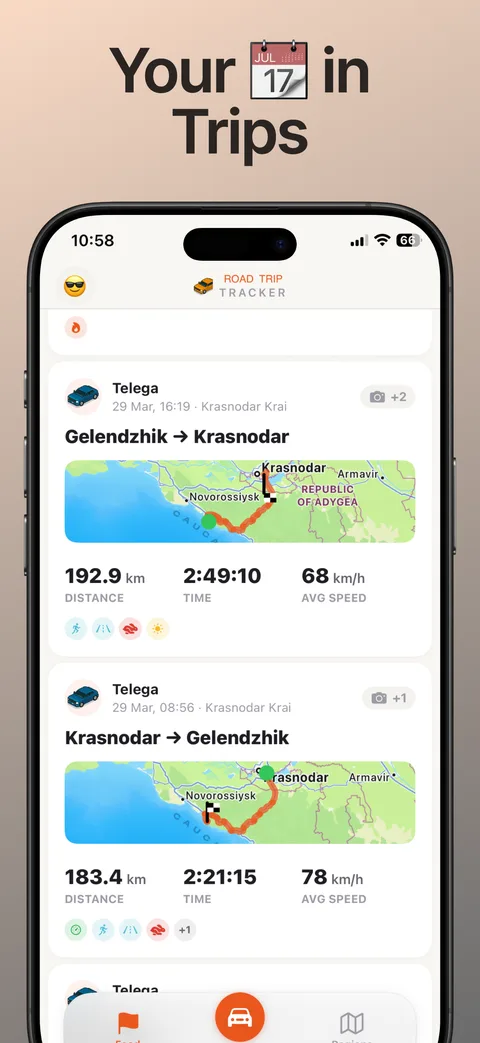
Start your driving diary
iPhone · iOS 17+ · Free · No sign-up